Built on Linux 6.19 with PREEMPT_RT
ꦮꦪꦁ

WayangOS

The Shadow that Powers the Machine

Ultra-minimal Linux distribution for embedded systems, real-time applications, and edge computing. Ancient art. Bare metal.

Get Started View Source →
~8MB
Root filesystem
64MB
Minimum RAM
<2s
Boot to shell
3
Architectures
ꦮꦪꦁ

Named after Wayang, the ancient Javanese shadow puppet art — WayangOS is the invisible hand that controls your hardware with precision and grace. Like the dalang who commands hundreds of puppets from behind the screen, WayangOS orchestrates your hardware with total control and zero waste.

WayangOS — v6.19
# Build for x86_64 with minimal config
$ ./build/build-kernel.sh x86_64 minimal
WayangOS Kernel Build
Architecture : x86_64
Config : minimal
 
# Boot with QEMU — 64MB RAM
$ qemu-system-x86_64 -kernel bzImage -initrd initramfs.cpio.gz -m 64M -nographic
WayangOS — The Shadow that Powers the Machine
Kernel: 6.19.0-wayang-minimal
Memory: 64MB
Boot time: 0.8s
 
root@wayang:~# _

Built Different

Every feature is a conscious choice. Every byte earns its place.

Ultra-Minimal

~8MB root filesystem. musl libc + BusyBox. No systemd, no D-Bus, no polkit. Just Linux, stripped to the essentials.

CC_OPTIMIZE_FOR_SIZE
🎯

Real-Time

PREEMPT_RT kernel with 1000Hz tick, IRQ forced threading, and CPU isolation. Deterministic scheduling for when microseconds matter.

CONFIG_PREEMPT_RT=y
🏗️

Multi-Architecture

First-class support for x86_64, ARM64, and RISC-V. One codebase, three architectures. Cross-compile from any host.

x86_64 | arm64 | riscv
📦

Container-Ready

Full namespace and cgroup support out of the box. Run containers on a 64MB system. OverlayFS, veth, bridge networking included.

namespaces + cgroups
🔒

Secure by Default

Minimal attack surface. No unnecessary services, no package manager bloat. Seccomp filters, read-only rootfs capable.

fewer packages = fewer CVEs
🤖

IoT & Robotics

GPIO, I2C, SPI support in the RT config. Built for sensor nodes, actuators, and edge compute. Runs on the smallest SBCs.

GPIO + I2C + SPI

How It Compares

Numbers don't lie. Less is more.

Metric WayangOS Alpine Linux Ubuntu Server Debian Minimal
Root FS Size ~8 MB ~130 MB ~1.2 GB ~300 MB
Min RAM 64 MB 128 MB 512 MB 256 MB
Boot Time < 2s ~5s ~15s ~8s
Init System Custom (shell) OpenRC systemd systemd
Libc musl musl glibc glibc
PREEMPT_RT ✓ Built-in ✗ Manual ✗ Manual ✗ Manual
RISC-V ✓ Native
Packages ~1 (BusyBox) ~14 (base) ~300+ (base) ~150+ (base)

Run Everywhere

One distro. Three architectures. Zero compromises.

x86_64
Servers, VMs, desktops, Intel/AMD
ARM64
Raspberry Pi, SBCs, edge devices
RISC-V
VisionFive, open silicon, the future
ꦮꦪꦁ

Download WayangOS

Prebuilt images ready to flash. Pick your architecture.

READY
🖥️

x86_64

Servers, VMs, Intel/AMD desktops

wayangos-0.2-x86_64.iso
13 MB · Bootable ISO with SSH + curl
⬇ Download ISO
📦 tar.gz (7.3 MB) · 📋 Release Notes
BUILDING
🤖

ARM64

Raspberry Pi, SBCs, edge & IoT

wayangos-0.1-arm64.tar.gz
~4 MB · Flash with dd or Etcher
⏳ Coming Soon
BUILDING

RISC-V

VisionFive, open silicon, future-proof

wayangos-0.1-riscv64.tar.gz
~4 MB · Experimental
⏳ Coming Soon

📖 Install Guide — 3 Easy Steps

No terminal skills needed. Works on any PC or laptop.

1

Download the ISO

Grab the bootable ISO (13 MB). Includes kernel, OS, SSH server, curl — everything in one file.

⬇ Download ISO (13 MB)
2

Flash to USB drive

Use any USB flashing tool. Pick your platform:

Open the tool → Select the .iso file → Select your USB → Click Flash. Done.

3

Boot from USB

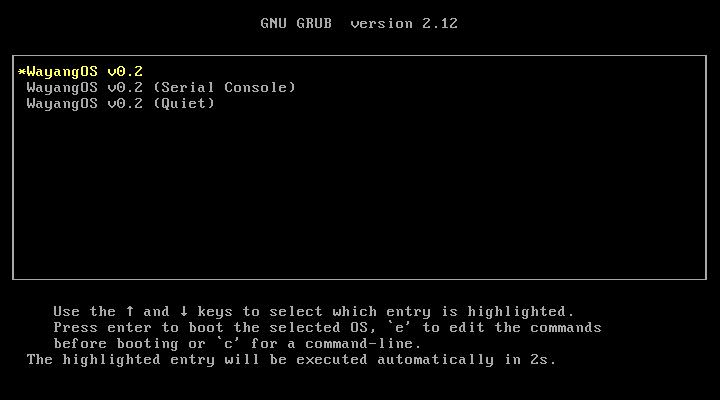
Plug the USB into your PC/laptop and restart. Press the boot menu key during startup:

F12 Dell, Lenovo, most laptops F2 ASUS, Acer, Samsung F9 HP Esc Some ASUS, other brands Del Custom desktops, motherboards

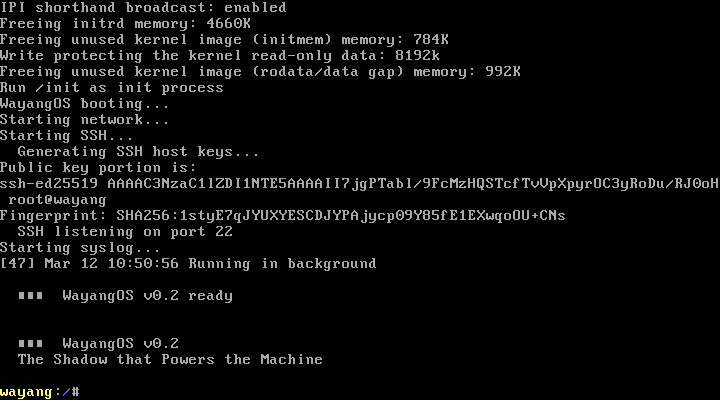
Select your USB from the boot menu → WayangOS boots to a shell in <2 seconds.

🧪 No USB? Try it in a virtual machine

qemu-system-x86_64 -cdrom wayangos-0.2-x86_64.iso -m 128M

Or open the .iso in VirtualBox / VMware — it just works.

🔧 Advanced: Manual USB install with GRUB (for developers)
# Download tar.gz instead of ISO
tar xzf wayangos-0.2-x86_64.tar.gz && cd wayangos-0.2-x86_64

# Partition & format USB (replace sdX)
sudo fdisk /dev/sdX # create 1 partition, type 83
sudo mkfs.ext4 /dev/sdX1
sudo mount /dev/sdX1 /mnt

# Install kernel + GRUB
sudo mkdir -p /mnt/boot/grub
sudo cp vmlinuz initramfs.img /mnt/boot/
sudo grub-install --target=i386-pc --boot-directory=/mnt/boot /dev/sdX
printf 'set timeout=3\nset default=0\nmenuentry "WayangOS" {\n linux /boot/vmlinuz console=tty0\n initrd /boot/initramfs.img\n}' | sudo tee /mnt/boot/grub/grub.cfg
sudo umount /mnt

Want to customize? Build from source:

🔧 View on GitHub →